
Which Photos Work Best for the In a Minute Wassup Generator?
November 6, 2026 · Updated November 6, 2026
Quick answer: Use 1–3 sharp, front-facing photos of one adult each, from the knees up or full body, in even light with no hats, sunglasses or heavy filters.
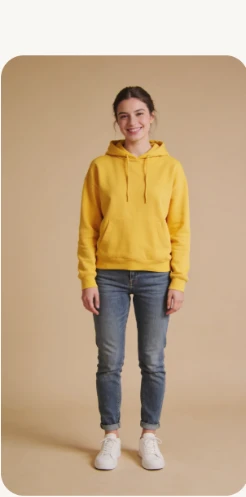
The generator redraws you as a full-body character and animates a very small, repeating motion. That makes photo quality the single biggest variable in whether the result looks like you.
The photo checklist
- One adult per photo. Group shots force the model to guess who should be the dancer.
- Face clear, front-facing, well lit. The sway is small, so the face is what people actually look at. No sunglasses, masks, hats or heavy shadows.
- Knees-up or full body. Your build and proportions carry into the drawing; a tight headshot makes them a guess.
- No beauty filters or cartoon effects. They smooth away the features the generator is trying to keep.
- Plain background helps, but is not required. The output always uses the trend’s white background.
What to avoid
| Problem | What happens |
|---|---|
| Several faces in one frame | The character may blend features or pick the wrong person |
| Sunglasses, cap or hood | Hair and eyes are guessed instead of kept |
| Backlit or dark shot | Facial detail is lost in the redraw |
| Children, celebrities, strangers | Not permitted; only adults who agreed to appear |
| Heavy filter / cartoon preset | The result looks less like you |
How many photos should I use?
One to three. With one photo, the same character fills the line-up — a good choice for a clean solo clip. With three photos, each person gets a dancer, which matches the original edit’s row of characters (the trend itself is covered in what the Wassup Been a Minute trend is). Photos are saved in your browser so you can rerun the same set at a different quality.
What happens after I upload?
The generator draws each photo as a 2D anime streetwear character on white, then animates the sway and beat-synced cuts into a 15-second landscape MP4. Full steps are in how to make a Wassup Been a Minute video; the look itself is explained in what Atlanta Lock is.
FAQ
Which photos work best for the In a Minute Wassup generator?
Sharp, front-facing photos of one adult each, from the knees up or full body, in even light, with the face unobstructed and no heavy beauty filters.
Can I use a group photo?
No. Use one person per photo, because the generator has to decide which face becomes the dancer. Split a group shot into separate crops first.
Does a head-and-shoulders selfie work?
Yes. The generator can complete the body, but a knees-up or full-body shot preserves your build and proportions more faithfully.
Can I use a photo of a child, a celebrity or a friend?
Only adults (18+) who agreed to appear. No children, celebrities or strangers, and no photos you do not have permission to use.
Do my clothes matter?
No. The generator draws the trend’s streetwear — puffer, chain, baggy jeans, white sneakers — regardless of what you wore in the photo.
Related guides
- How to make a Wassup Been a Minute AI video
- CapCut template vs AI generator for the Wassup Been a Minute trend